Walkthrough C: relationships between entities
The third research pattern is for statistical variables that describe a relationship
between entities rather than a property of one place: aid from a donor to a
recipient, trade between two partners, migration from an origin to a destination. The
server carries a playbook and a
tool, get_multi_entity_observations, for exactly this. As on
Walkthrough A and B, every cell below executes
against the live server at build time. This one checks for the entity roles the
playbook relies on, explains why its upstream example does not apply here, and then
shows how the same kind of question is answered on this instance today.
import sys
from pathlib import Path

sys.path.insert(0, str(Path.cwd().parents[1]))
from plugins.mcp_client import McpClient, call_tool
from plugins import walkthrough as wt

client = McpClient()
client.initialize()["serverInfo"]
Output
{'name': 'DC MCP Server', 'version': '1.3.0'}1. Discover: look for entity roles
The playbook’s first step is search_indicators, inspecting each candidate’s
observation_properties — the entity roles such as donor and recipient that mark
a multi-entity variable. Called without places, the search answers with a
variableCandidates table that carries that column.
found = call_tool(
    client,
    "search_indicators",
    query="official development assistance",
    include_topics=False,
    per_search_limit=8,
)
wt.candidates(found)Every candidate is an ODA series measured about one country — a donor’s outflow or a recipient’s inflow, from the SDG and WHO datasets — and the relationship column is empty for all of them.
print(f"{len(wt.multi_entity_candidates(found))} of {len(found['variableCandidates']['rows'])} candidates carry entity roles")0 of 8 candidates carry entity roles
2. Diagnostic note: why the upstream example does not apply here
This section is reference material, not a research step. The playbook’s first recipe is gross ODA from the United Arab Emirates to Afghanistan:
get_multi_entity_observations(
    variable_dcid="Amount_EconomicActivity_GrossODA",
    entities={"donor": ["country/ARE"], "recipient": ["country/AFG"]},
)
That identifier belongs to the wider Data Commons graph, not to this corpus, so the recipe is quoted here and not run: retrieving it would not be a UN System Data Commons research step (see Statistical scope). Tried once against this server on 2026-09-11, the call was refused by the data backend:
failed to execute SDMX data query: rpc error: code = InvalidArgument desc =
unsupported SDMX component filter "donor"; filterable components are [TIME_PERIOD
facetId measurementMethod observationAbout observationPeriod provenance unit
variableMeasured]
That message comes from the instance’s data backend, which is SDMX: it lists the
components a query may filter on, and they are the familiar single-place ones —
observationAbout, variableMeasured, TIME_PERIOD and the facet properties. There is
no donor dimension because the UN System Data Commons loads UN agencies’ SDMX
dataflows, in which every observation is about one place. The wider graph’s
multi-entity variables are not part of it.
3. How relational questions are answered here
The relationship is not missing from the data, it is expressed differently. Where the wider Data Commons graph models refugees from Afghanistan in Pakistan as one variable with an origin and a destination role, this instance publishes one statistical variable per origin, observed about the host country. The origin becomes a constraint in the variable’s definition and the host is the place — so patterns A and B do the work.
found = call_tool(
    client,
    "search_child_indicators",
    query="refugees from Afghanistan by country of asylum",
    parent_place="World",
    sample_child_places=["Pakistan", "Germany", "Turkey", "India", "Uganda"],
    include_topics=False,
    per_search_limit=8,
)
wt.candidates(found)UNHCR’s end-year population series comes back once per breakdown; the plain refugees
variable, with no age or sex split, is the one to proceed with. Its metadata states the
origin and the population group as constraints: “Country or area of origin” is a
constraint property fixed to Afghanistan, and “Population group” one fixed to Refugees.
The DCID carries the same facts in identifier form (COO--G00000020, where G00000020
is the UN Data geography code for Afghanistan, reused consistently across the
contributing agencies’ datasets); read them from the metadata, not from the identifier.
variable = "undata/unhcr/END_YEAR_POPULATION.COO--G00000020__POPULATION_GROUP--REFUGEES"
meta = call_tool(client, "get_variable_metadata", variable_dcids=[variable], entity_dcids=["Earth"])
wt.constraints(meta, variable)Retrieval is then pattern B: the latest value for every country of asylum.
obs = call_tool(
    client,
    "get_child_observations",
    variable_dcid=variable,
    parent_place_dcid="Earth",
    child_place_type="Country",
    date="latest",
)
hosts = wt.child_observations(obs)
hosts.head(10)Source
wt.top_chart(hosts, title="Refugees from Afghanistan, by country of asylum", unit="persons")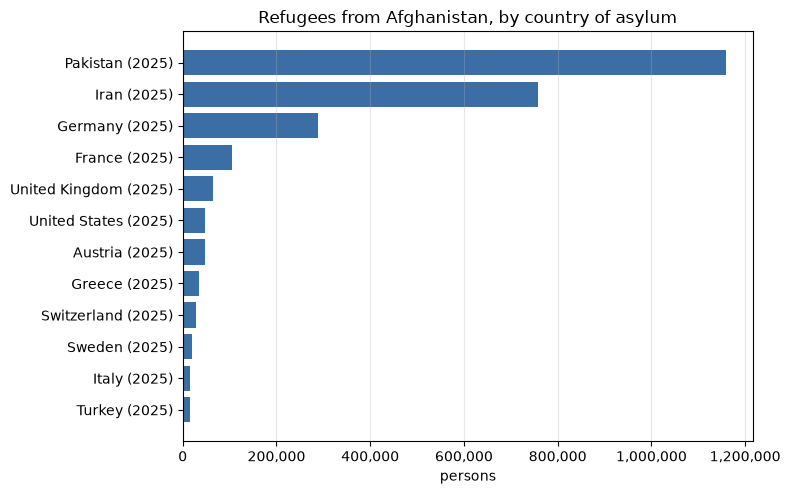
years = hosts["date"].value_counts().sort_index()
print(
    f"{len(hosts)} host countries; latest values span {years.index[0]}–{years.index[-1]}; "
    f"source {obs['sourceMetadata']['provenanceUrl']}"
)
113 host countries; latest values span 2003–2025; source https://www.unhcr.org/
The other direction — every origin for one host country — is the same shape read the other way: the host is the place and each origin is its own variable, so it takes a search or metadata call per origin. That per-pair cost is what the multi-entity tool was designed to remove, and it is why this walkthrough will be rewritten the day the relationship column stops being empty. As on every page, the source in the last line is what the server’s instructions require you to cite alongside the numbers.